Apple Intelligence in PDF Editor, PDF Book Reader®

Apple Intelligence, built into your PDF workflow.

PDF Editor, PDF Book Reader® brings Apple Intelligence directly into everyday document workflows — helping you summarize pages, generate meaningful document titles, organize with suggested tags, and find PDFs faster with Smart Categories.

Built using Apple technologies.

Apple Intelligence features in PDF Editor, PDF Book Reader®

Page Summary

Understand a page without reading every line.

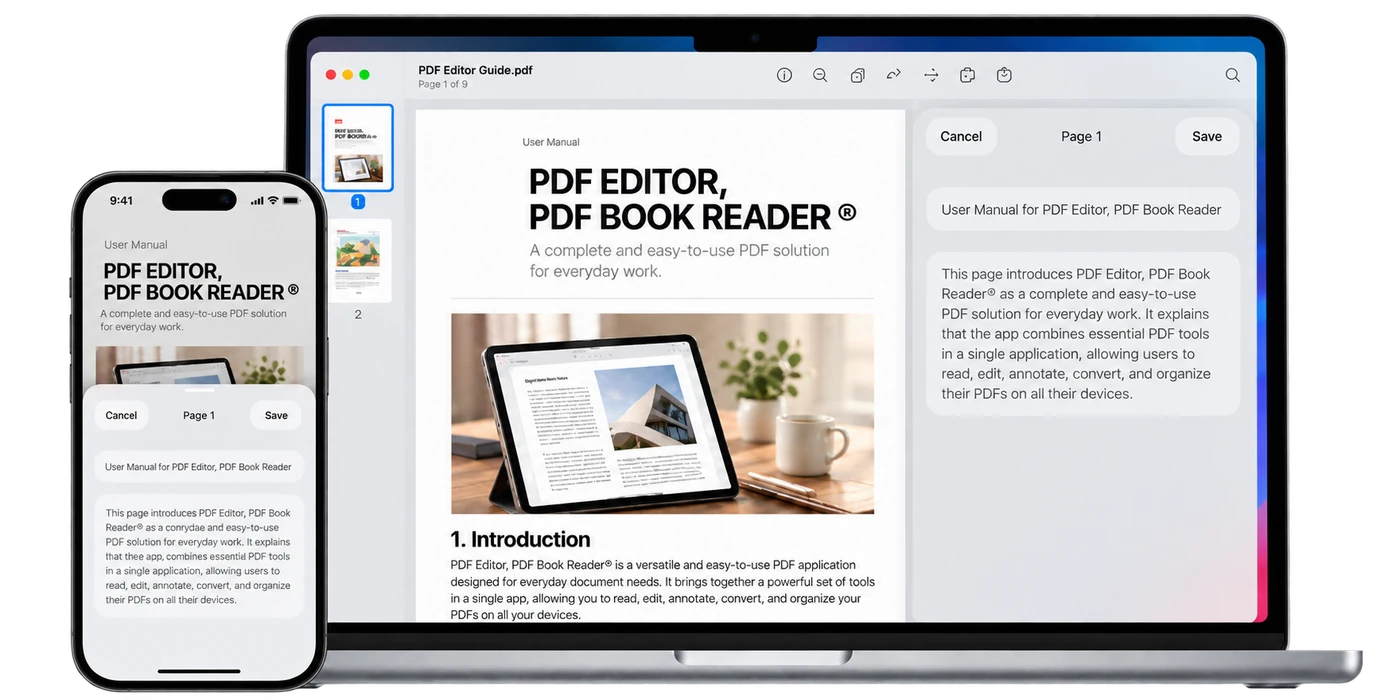
Open any PDF page and use Apple Intelligence to generate a concise summary of the content you’re viewing.

The summary appears directly inside the reading experience, helping you understand the current page without leaving your document.

You can read the summary, copy it, share it, or save it as a Note.

Summaries are generated one page at a time, keeping the experience focused on exactly what you’re reading.

Automatic Document Titles

Give every PDF a title that makes sense.

Apple Intelligence can automatically generate a meaningful display title based on the content of a PDF, making documents easier to recognize at a glance in your Library.

Your original filename remains unchanged.

If you want something different, open Edit Title to refine the title yourself or view a fresh suggestion generated by Apple Intelligence.

Suggested by Apple Intelligence. Refined by you.

Original filename Suggested title Edit Title

A clearer Library, without renaming the original file.

Suggested Tags

Organize PDFs with a little help from Apple Intelligence.

When you open the Tags menu for a PDF, Apple Intelligence can suggest up to three relevant tags based on the document’s content.

Choose the suggestions that are useful to you, ignore the ones you do not need, or continue using your own tags as usual.

Nothing is added automatically. You stay in control of how your documents are organized.

Smart suggestions when you want them. Your tags, your choice.

Smart Categories

Find the kind of document you’re looking for.

Apple Intelligence can recognize common document types in your Library and organize them into useful categories such as Books, Tickets, Receipts, Contracts, Manuals, and other supported document types.

Only categories that actually exist in your Library appear as filters.

Looking for a ticket? Choose Tickets and see the matching PDFs immediately.

If a document cannot be clearly categorized, it simply remains in your Library without being placed into a category.

Categories appear naturally from the PDFs already in your Library.

Library Filter Categories Matching PDFs

Privacy by Design

Intelligence without third-party AI.

Apple Intelligence features in PDF Editor, PDF Book Reader® are built using Apple’s own system frameworks and technologies.

The app does not send your PDF content to the developer’s servers or to third-party AI services.

No third-party AI SDKs, external AI APIs, or separate document-processing services are used.

Apple technologies only.

No third-party AI.

No developer-side document processing.

Learn more about privacy

Across Apple

Apple Intelligence, across your PDF workflow.

Apple Intelligence features in PDF Editor, PDF Book Reader® are available across iPhone, iPad, Mac, and Apple Vision Pro on supported devices.

Summarize a page while reading, recognize documents more clearly in your Library, organize with suggested tags, and find PDFs through Smart Categories — all within the same familiar experience across Apple platforms.

Apple Intelligence features are available on supported devices where Apple Intelligence is enabled and available.

PDF Editor, PDF Book Reader®

Intelligence that stays part of the document experience.

Apple Intelligence in PDF Editor, PDF Book Reader® is designed to make everyday PDF work feel simpler — helping you understand pages, recognize documents, organize your Library, and find what you need with less effort.

Available across iPhone, iPad, Mac, and Apple Vision Pro.